Series · BitLocker startup PIN without ServiceUI · Part 2 of 2
Microsoft Intune · BitLocker · Win32 apps · PowerShell · Endpoint operations
BitLocker PIN without ServiceUI, part 2: deploy and verify
Deploy the helper through Intune, choose a retry route, and verify the laptop's actual boot behavior. Installation success and a present PIN protector each tell only part of the story.
- Drafted
- Published
- Updated
- Reading time
- 10 min
- Author
- Roberto Gramellini
Source:
BitLocker startup PIN for Intune
· revision 1c64fc4a
- bitlocker-pin-native
- Intune BitLocker PIN deployment
- Win32 registry detection
- TPM PIN enrollment
- BitLocker protector verification
- Intune Remediations
BitLocker PIN without ServiceUI, part 2: deploy and verify
A green installation result and a laptop that still boots without a PIN can both be correct. Perhaps the person was away when the helper ran. Perhaps they cancelled. Or perhaps a PIN protector was added while a standalone TPM protector remained.
I'd want to know which happened before sending another reminder. bitlocker-pin-native deliberately separates helper installation from PIN enrollment. Proving the intended boot behavior takes another check, beyond the supplied detector.
Part 1 follows the SYSTEM coordinator and user-token dialog that replace ServiceUI.exe. Here we deploy version 1.2.3 as described at revision 1c64fc4a866b503245920a2585dfc110775c3d71, then work through retries, protector changes and what uninstall actually undoes.
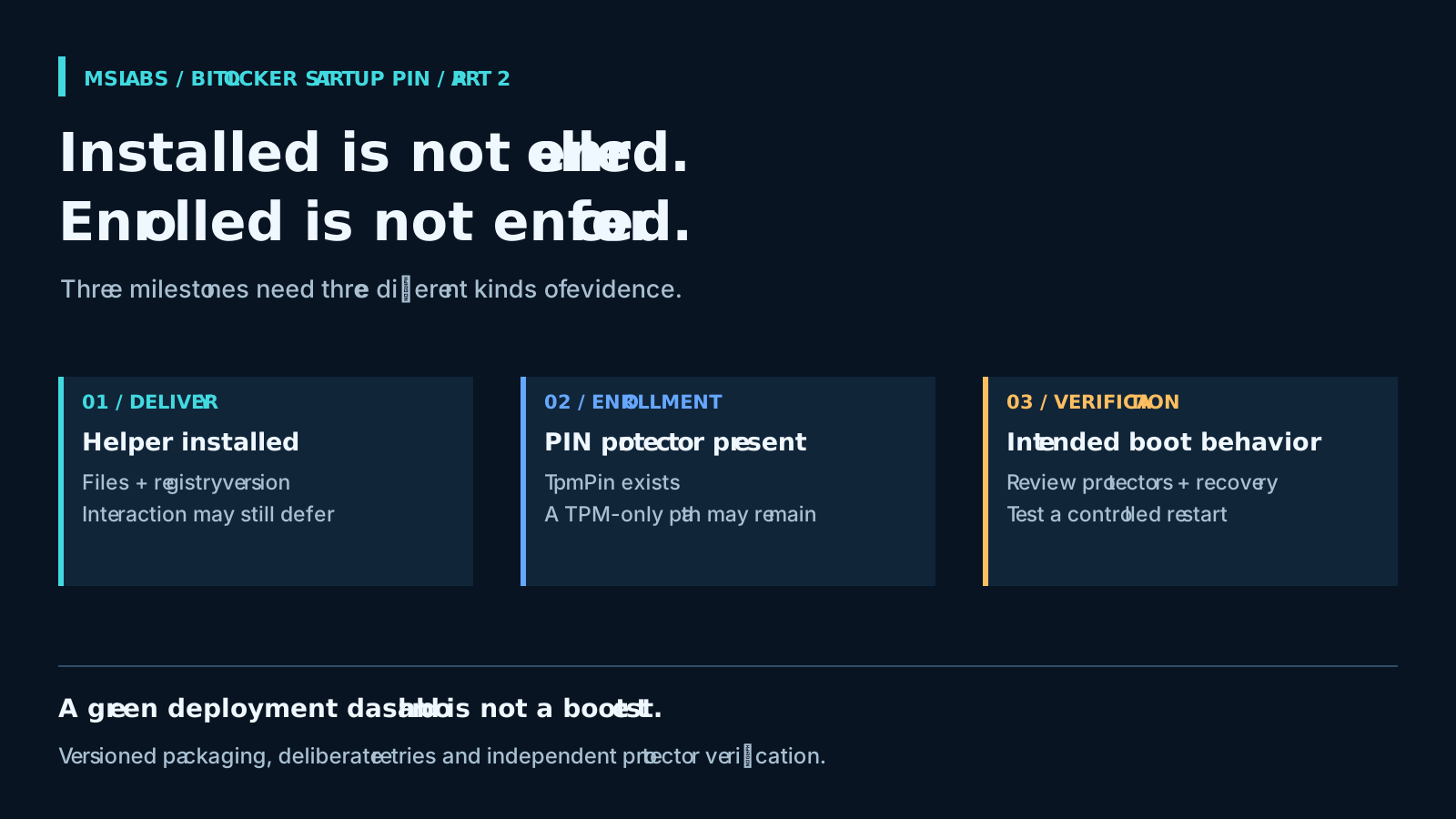
Decide what "done" means before assignment
| Milestone | Evidence to collect | What it does not establish |
|---|---|---|
| Helper installed | Expected files and the versioned registry detection marker | A person chose a PIN |
| PIN protector present | TpmPin exists on the system volume |
Every non-PIN startup path was removed |
| Intended boot behavior verified | Reviewed protector inventory, active protection, authorized recovery readiness and a controlled restart test | All future policy, hardware or recovery states are safe |
Keep those results separate in reporting. The installation contract answers whether the helper arrived; asking it to certify boot authentication gives a green dashboard rather more authority than it deserves.
First, check policy and recovery access
This package belongs after silent encryption has already completed. Microsoft's BitLocker deployment guidance for Intune explains why interactive startup authentication cannot be required during the silent stage. The later PIN interaction is a separate deployment.
Settle the effective startup-authentication policy first, including conflicts with security baselines. Copying a table of individually sensible but incompatible requirements will not help. Decide the supported TPM-and-PIN configuration, allowed PIN format and length, and which device groups should reach this later enrollment stage.
The coordinator requires active protection and a fully encrypted system volume; it will not start encryption. The source targets Windows 10/11 with x64 packaging. Check current support for the OS build and edition, TPM readiness, PowerShell and application controls yourself. An old minimum release in an Intune requirement rule does not extend Windows support.
Above all, verify the recovery-password protector and authorized access to its escrowed information before rollout. Preserving existing recovery protectors, as this script does, is useful only if those protectors exist and somebody can retrieve the right information. The script neither backs them up nor validates Entra escrow before changing boot protectors.
What the installer actually confirms
install.cmd puts the scripts and configuration in a persistent ProgramData helper directory. It reads version.txt, writes the registry marker, attempts optional shortcut and recurring-task creation, then runs the SYSTEM coordinator once.
Its final exit code is always 0. I understand the reason: a cancelled dialog should not make an installed helper look broken. But file-copy or task-registration failures can also sit behind that result, as can an unsuccessful protector operation. Inspect the files, marker and logs together.
For Win32 detection, the documented rule compares the 64-bit registry Version under HKLM\SOFTWARE\MSLABS\BitLockerPIN with the packaged version. You can see the exact string comparison being constructed in the publisher implementation.
That lets the user interaction happen later without confusing application detection. Use protector presence instead and a properly installed helper becomes "not detected" every time the user is absent or cancels.
One source detail can send you in the wrong direction: the standalone detection script's header still describes both Win32 and Remediations use. For this package flow, follow the registry-marker rule in the deployment guide and publisher, rather than that older header.
Read the publisher before running it
The value in src/version.txt normally feeds the installation marker, published app version and detection comparison. Keep the packaged content in step with it.
The Publish-ToIntune.ps1 helper uses the Win32 Content Prep Tool and an authenticated Intune publishing module. App-only publishing needs an authorized app registration with the documented DeviceManagementApps.ReadWrite.All application permission. Keep credentials out of source control and general-purpose examples. Ignoring a local secret file in Git does not make it anything other than a secret file.
Before using the helper against an existing deployment, allow for these behaviors:
- It can reuse an existing package unless you request a rebuild. Updating the version without rebuilding can therefore upload old content with a new detection value.
- It removes and recreates matching app objects by display name. This is not an in-place update. Do not expect assignments or object references to survive; the new app gets only the optional group assignment explicitly supplied.
Plan the assignment migration before running that replacement. This article does not run the publisher or change Intune assignments.
Give people a sensible way to retry
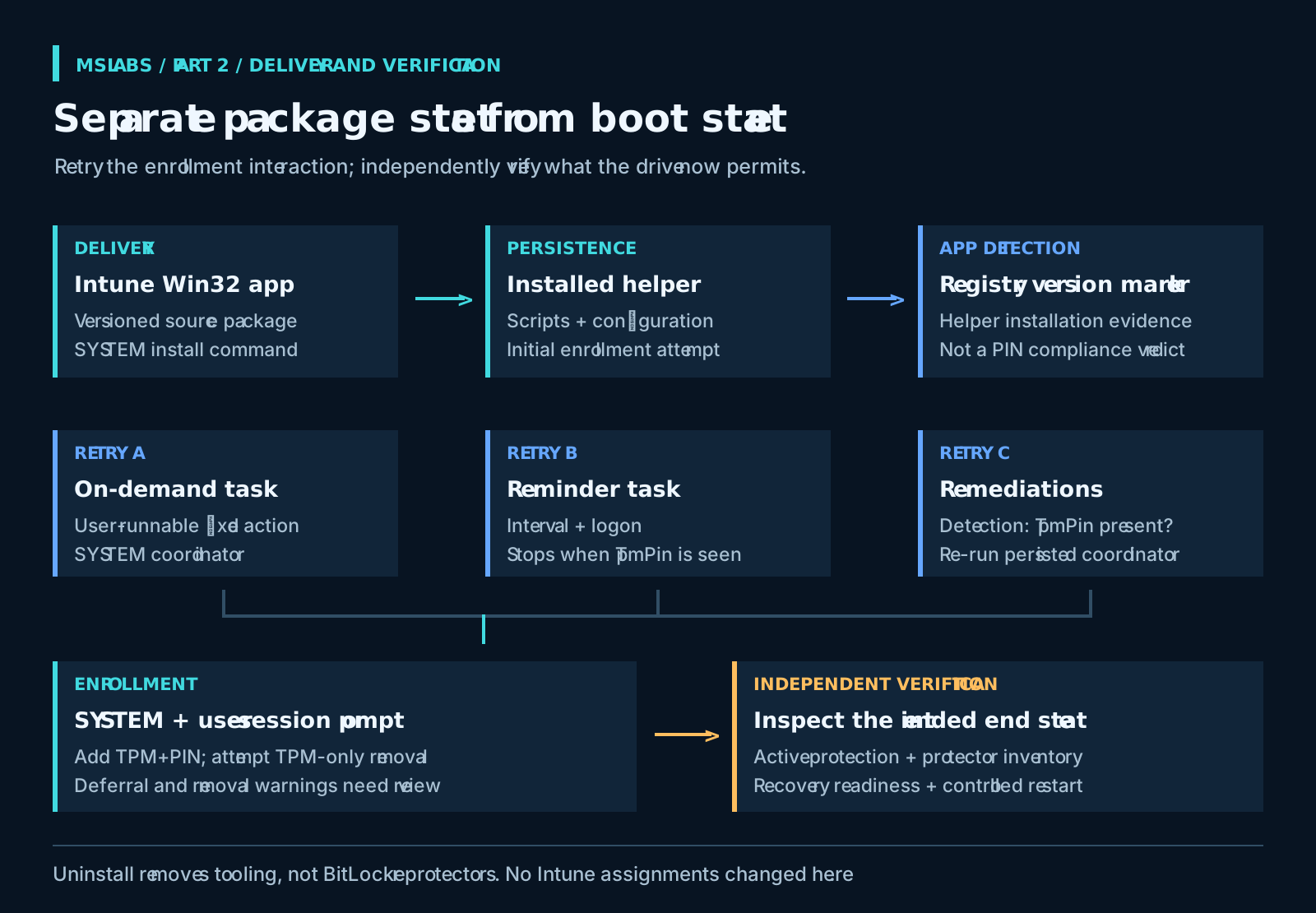
Installing at a convenient time for Intune does not mean it is a convenient time for the person. The repository offers several retry routes:
| Path | Trigger and context | Important boundary |
|---|---|---|
| Optional desktop shortcut | User requests an on-demand scheduled task running as SYSTEM | Users can start the task, not choose an arbitrary privileged command |
| Recurring reminder | SYSTEM task on a configurable interval and at logon | Stops when its TpmPin presence test succeeds |
| Intune Remediations | Scheduled detection followed by the persisted coordinator | A detection failure triggers another attempt, not proof that repair will complete |
The public-desktop shortcut created by Set-BspShortcut.ps1 invokes a fixed scheduled action. Authenticated users get read/execute access to the task, not permission to edit it. That distinction is essential for an action running as SYSTEM.
Then inspect the target files on the installed device. If a standard user can replace the persisted scripts or configuration, the task descriptor does not save the action. Audit the helper directory and effective inherited permissions. A ProgramData address alone is no evidence of hardening.
For recurring attempts, Set-BspReminder.ps1 creates a task with a shipped four-hour interval. Setting the interval to zero disables this reminder only: the install-time attempt and optional shortcut are separate. When a run sees TpmPin, it removes the reminder task.
I'd start a pilot with only the retry mechanisms it needs. Task instance settings and the session-local dialog mutex reduce overlap, but they do not provide a global lock across all triggers and SYSTEM runs. Test the timeout path before adding more reminders. More scheduling is not automatically more enrollment.
If Remediations is the chosen route, check Microsoft's current prerequisites. Its licensing, management and join requirements are separate from those of the helper.
A PIN protector can coexist with TPM-only boot
The check in Detect-BitLockerPin.ps1, lines 13-18 answers a small, specific question:
$vol = Get-BitLockerVolume -MountPoint $env:SystemDrive -ErrorAction Stop
$hasPin = $vol.KeyProtector | Where-Object { $_.KeyProtectorType -eq 'TpmPin' }
if ($hasPin) {
    Write-Output "BitLocker TPM+PIN protector present on $($env:SystemDrive)."
    exit 0
}
A missing matching protector or an exception returns exit 1. Finding one does not trigger checks for a remaining standalone TPM protector, recovery escrow or active protection.
The coordinator adds TPM-and-PIN first and only then attempts standalone TPM removal. This order makes sense: do not remove the existing automatic-unlock method before the replacement has been added successfully.
Here is the catch. Removal failures are warnings, and execution still reaches a successful return. Once TpmPin exists, a later run returns early instead of repeating TPM-only cleanup. The detector can be satisfied and the reminder can stop while the standalone TPM path is still available.
That calls for independent verification, not an improvised script that silently deletes protectors. Review the exact inventory, design any remediation deliberately and confirm recovery access before a controlled restart test. Preserve the organization's recovery route. Requiring a PIN for intended normal startup must not be confused with claiming that no recovery method can ever unlock the volume.
Keep the unsuccessful attempts visible
The helper log records drive readiness, dialog launch, child exit and token-source diagnostics, protector add/remove outcomes and errors. Read that sequence. The installer exit code deliberately compresses too many different outcomes to explain one on its own.
During the pilot, distinguish no session from unfinished encryption, cancellation from an existing dialog, and timeout from protector-add rejection or TPM-only removal failure. Do not export the PIN, transfer key or full user-process environment while collecting diagnostics.
As part 1 explains, a configured minimum can override the policy minimum previously read by the UI. Test that mismatch and enhanced-PIN compatibility. Seeing masked characters in a completed form tells us the UI accepted input, not that BitLocker accepted the protector.
Uninstall leaves the protectors alone
The cleanup in uninstall.cmd and Uninstall-BitLockerPin.ps1 attempts to remove the shortcut, tasks, registry marker and helper files. BitLocker protectors deliberately remain.
I'd keep that behavior. Removing an enrollment app should not quietly weaken disk protection. Cleanup is best-effort, though, so check task and file removal as well.
Changing startup authentication requires a separately authorized protector migration, with aligned policy and confirmed recovery access. "Uninstall app" does not mean "restore TPM-only boot." Test the rollback before a device asks for recovery, not while somebody is waiting at that screen.
Finish the pilot at the laptop
Choose a small group with verified recovery access and a prepared support team. Explain that the BitLocker startup PIN and Windows sign-in PIN are different. Check the deployment artifacts, deliberately exercise cancellation and deferral, and finish by inspecting the protectors and testing a controlled restart.
Before adopting it as a service, inspect the repository at the reviewed revision. Somebody still needs to own policy, session selection, retries and recovery. The launcher removes a dependency; it does not remove that work. Close the rollout when the device demonstrates the intended boot behavior, even if the dashboard was ready to celebrate earlier.
Source attribution and license
The project credits Oliver Kieselbach's startup-PIN approach and the Blufix packaging as inspiration. The prose and illustrations here are original. The excerpt is from robgrame's repository and is reproduced under the MIT license at the reviewed revision:
MIT License
Copyright (c) 2026 robgrame
Permission is hereby granted, free of charge, to any person obtaining a copy of this software and associated documentation files (the "Software"), to deal in the Software without restriction, including without limitation the rights to use, copy, modify, merge, publish, distribute, sublicense, and/or sell copies of the Software, and to permit persons to whom the Software is furnished to do so, subject to the following conditions:
The above copyright notice and this permission notice shall be included in all copies or substantial portions of the Software.
THE SOFTWARE IS PROVIDED "AS IS", WITHOUT WARRANTY OF ANY KIND, EXPRESS OR IMPLIED, INCLUDING BUT NOT LIMITED TO THE WARRANTIES OF MERCHANTABILITY, FITNESS FOR A PARTICULAR PURPOSE AND NONINFRINGEMENT. IN NO EVENT SHALL THE AUTHORS OR COPYRIGHT HOLDERS BE LIABLE FOR ANY CLAIM, DAMAGES OR OTHER LIABILITY, WHETHER IN AN ACTION OF CONTRACT, TORT OR OTHERWISE, ARISING FROM, OUT OF OR IN CONNECTION WITH THE SOFTWARE OR THE USE OR OTHER DEALINGS IN THE SOFTWARE.