Series · BitLocker startup PIN without ServiceUI · Part 1 of 2
Microsoft Intune · BitLocker · PowerShell · Windows security · Native APIs
BitLocker PIN without ServiceUI, part 1: show the PIN prompt
See how SYSTEM launches a user-session PIN dialog and receives an encrypted response, then check the session, memory, timeout and recovery assumptions before rollout.
- Drafted
- Published
- Updated
- Reading time
- 9 min
- Author
- Roberto Gramellini
Source:
BitLocker startup PIN for Intune
· revision 1c64fc4a
- bitlocker-pin-native
- BitLocker startup PIN
- ServiceUI replacement
- WTSQueryUserToken
- CreateProcessAsUser
- SYSTEM user session
BitLocker PIN without ServiceUI, part 1: show the PIN prompt
The laptop is already encrypted. Enrollment completed quietly, TPM protection is in place, and now the organization wants a startup PIN too. Running encryption again will not solve this. Somebody has to ask the signed-in person for a PIN and apply the resulting protector change.
This is where an otherwise simple installation script gets awkward. Intune runs it as SYSTEM; the person works on another desktop in another session. A dialog created by the installer does not automatically appear there. Windows does not make exceptions for deployment deadlines, which is probably for the best.
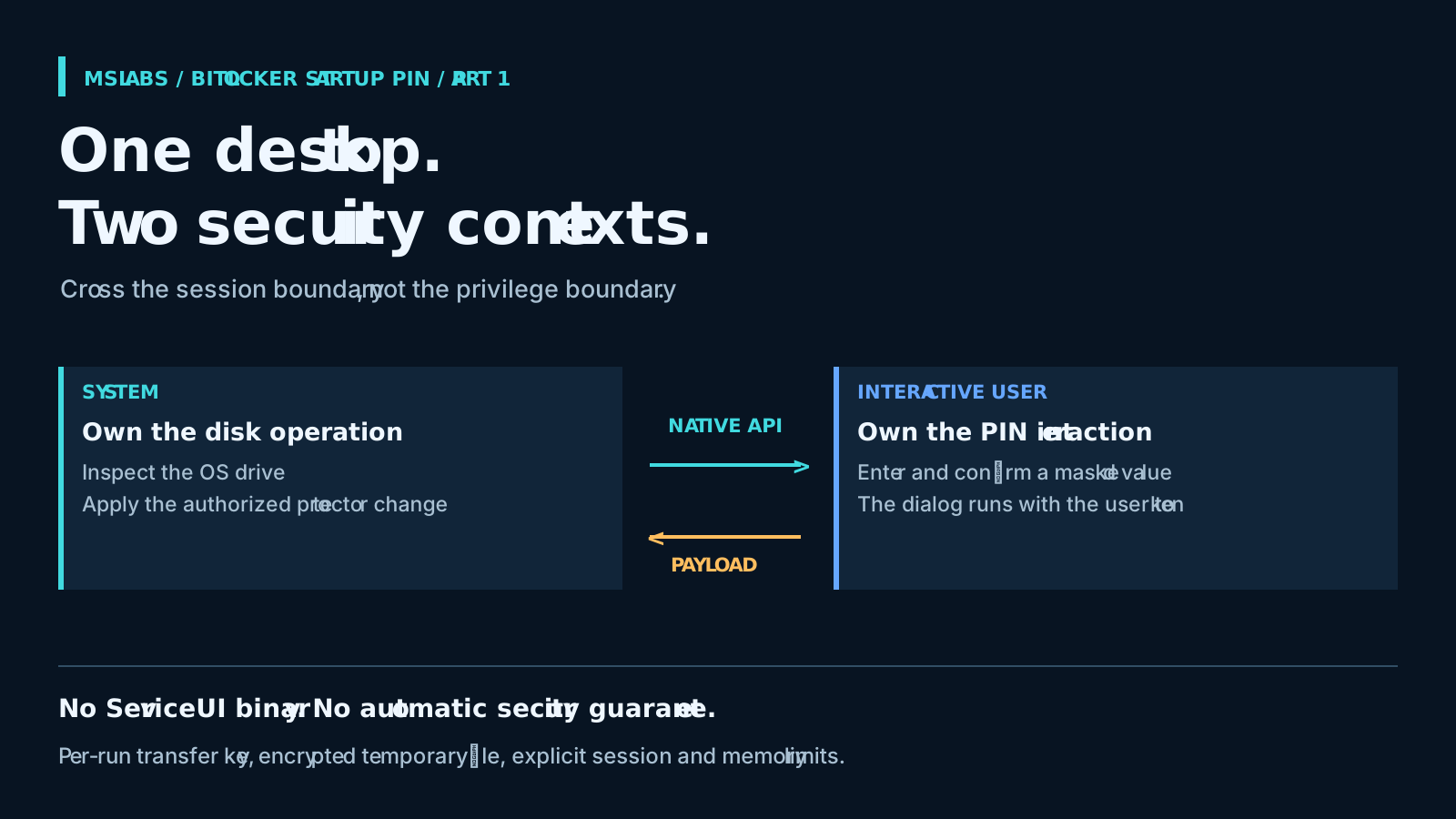
bitlocker-pin-native handles the handoff with two processes. The privileged PowerShell coordinator owns the BitLocker change. A native Windows launcher starts the PIN-entry process with the interactive user's token. That removes the external ServiceUI.exe dependency, but the Windows security-context work is still there. It deserves review, perhaps more than the dialog does.
Here I'll follow the launch, the dialog and the returned PIN. Rollout needs its own discussion: Part 2 looks at installation, retries and how to verify that the intended startup behavior was actually achieved. Both articles use revision 1c64fc4a866b503245920a2585dfc110775c3d71, where the package version is 1.2.3.
Let silent encryption finish first
Microsoft's Intune BitLocker guidance rules out requiring an interactive TPM startup PIN or startup key during silent encryption. The word "during" matters. A TPM-and-PIN protector can be added later, once the volume is encrypted.
Changing an authentication setting does not somehow choose a PIN for an existing TPM-only device. The value still has to come from a person, and an authorized process has to add the protector. This project is aimed at endpoint engineers making that move from silent TPM-only provisioning to a reviewed pre-boot authentication design.
The scripts split those jobs like this:
| Component | Runs as | Responsibility |
|---|---|---|
Set-BitLockerPin.ps1 |
SYSTEM | Inspect the OS drive, arrange the handoff, apply the protector change |
NativeUserLauncher.ps1 |
Called by SYSTEM | Resolve a user token, build the environment and start the child |
BitLockerPinPrompt.ps1 |
Interactive user | Show localized WinForms fields, validate input and return an encrypted payload |
There is no reason to make the dialog SYSTEM merely to show it to the user. I'd keep that privilege with the coordinator, where the disk operation actually needs it. A friendly-looking form does not make the parent any less privileged.
Sometimes the right result is no dialog
Set-BitLockerPin.ps1 starts by reading the system volume. Finding TpmPin is enough for an immediate successful return. If protection is off or encryption is incomplete, it also leaves without prompting; enrollment waits for another run.
So arrange encryption elsewhere. This coordinator will not start it for you. Also note that a missing expected standalone TPM protector generates a warning rather than stopping execution.
The existing-TpmPin shortcut makes repeat runs convenient, but it skips a question that matters for enforcement: is a standalone TPM protector still present alongside the PIN protector? That early return does not check. A script can be pleasantly repeatable and still leave a boot path you did not intend.
Launching in the user's session
The C# interoperability layer lives inside NativeUserLauncher.ps1. It tries the active console session first and falls back to Explorer-based discovery. The preferred token path calls WTSQueryUserToken and duplicates the result as a primary token. For the fallback session, if that approach fails, it can duplicate Explorer's token instead.
Before borrowing this technique, read Microsoft's WTSQueryUserToken requirements. The caller is expected to be a highly trusted LocalSystem service with the appropriate privilege. An ordinary user script cannot use it as a general way to acquire somebody else's rights.
With the token available, the launcher builds a user environment, merges the extra values and selects winsta0\default for the desktop. The startup information and environment are prepared just before this contiguous excerpt from lines 169-175:
uint flags = CREATE_UNICODE_ENVIRONMENT;
if (!visible) flags |= CREATE_NO_WINDOW;

PROCESS_INFORMATION pi;
bool ok = Api.CreateProcessAsUser(token, app, cmd, IntPtr.Zero, IntPtr.Zero, false,
    flags, mergedEnv, null, ref si, out pi);
if (!ok) throw new Exception("CreateProcessAsUser failed: " + Marshal.GetLastWin32Error());
The process-creation call is only the last part. The selected token, desktop and environment determine where the dialog runs and under whose identity. Microsoft's CreateProcessAsUserW reference is useful reading for those privilege and environment requirements.
Do not stretch console-first selection into a promise about every Windows session. The selected person may not be the one who clicked an on-demand shortcut. Shared devices and multi-session endpoints need their own tests, including remote, locked and disconnected sessions. I'd settle that behavior in the pilot rather than discover it from a confused user's screenshot.
What the dialog checks
The WinForms UI is in BitLockerPinPrompt.ps1. Configuration and environment values supply the organization name, accent color and language. Italian and English resources are included, with a fallback for a missing language block.
Both fields are masked. The dialog compares the entries, enforces a minimum length and rejects repeated or monotonically sequential characters. Unless enhanced PIN policy is enabled, input must be numeric. These checks spare the user some avoidable failures. They cannot overrule BitLocker policy when the coordinator tries to add the protector.
There is a detail here that is easy to read too quickly. The dialog first reads FVE MinimumPIN, then applies the coordinator's BLPIN_MINPIN if supplied. At this revision, the environment value can replace the minimum shown by the UI. Align the configuration with device policy, and test a rejected PIN through the actual BitLocker call. Assuming "policy wins" from the order of the first lookup would give the wrong answer.
A session-local mutex helps avoid stacked prompts: a later dialog normally focuses the existing window and exits with a dedicated code. Useful, but only within that session. It does not serialize every SYSTEM coordinator or protector operation, and failure to create the mutex allows the dialog to continue.
Returning the PIN to SYSTEM
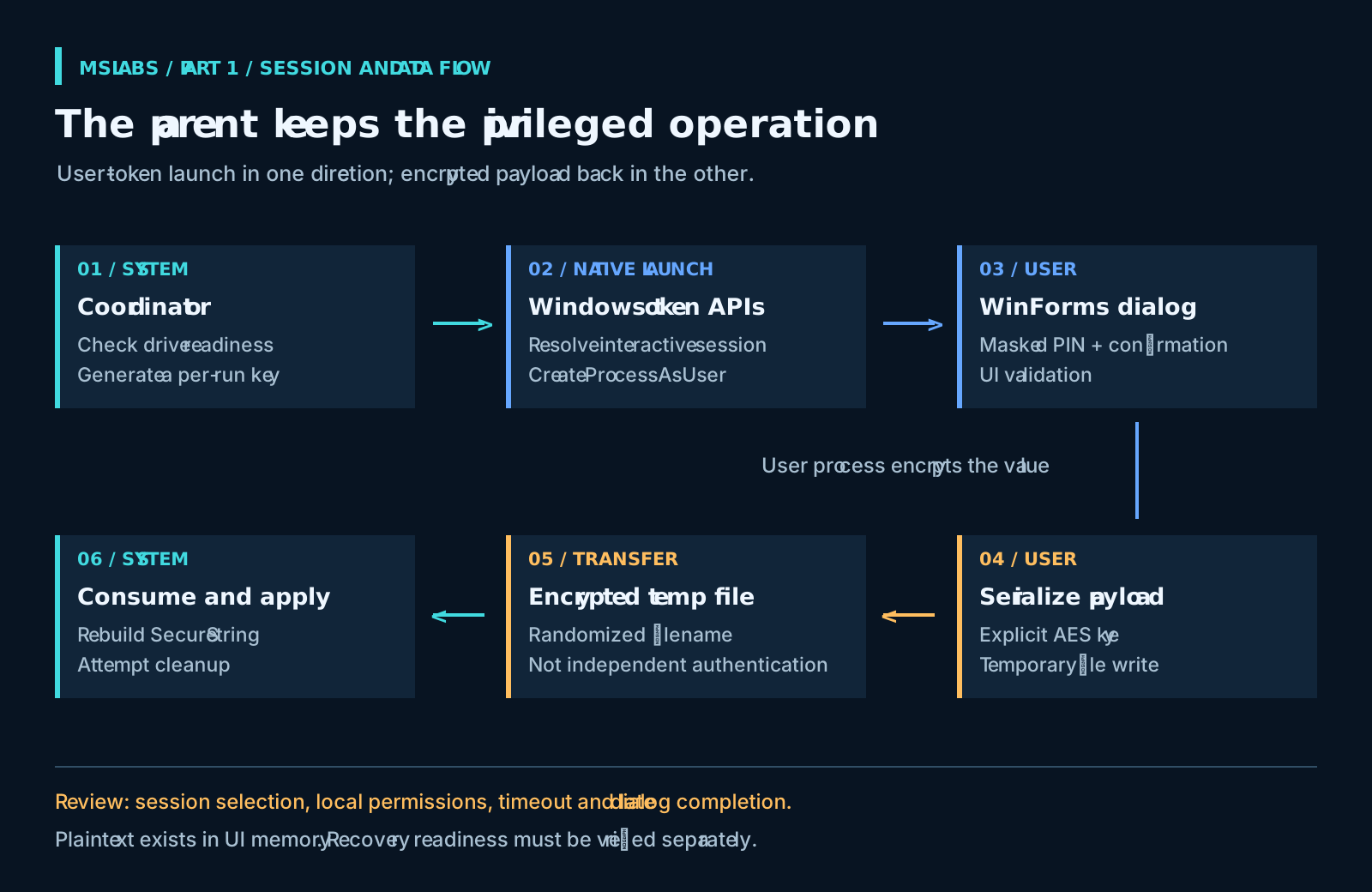
For each run, SYSTEM creates a random 32-byte key and a randomized temporary filename. The child receives those values and the display parameters through its environment, not command-line arguments. Once the person accepts, the dialog creates a SecureString and serializes it using the supplied key.
The file write is visible in this contiguous excerpt from dialog lines 303-306:
$key = [Convert]::FromBase64String($keyB64)
$secure = ConvertTo-SecureString $pin -AsPlainText -Force
$enc = ConvertFrom-SecureString -SecureString $secure -Key $key
Set-Content -Path $tmpFile -Value $enc -Encoding ASCII -Force
The parent reads that encrypted representation, reconstructs the SecureString with the same key and makes the privileged call itself. Cleanup in its finally block attempts payload deletion, zeroes the original key byte array and clears the related parent environment variables.
This avoids a reusable hard-coded key and deliberately keeps the plaintext PIN out of the transfer file. It does not keep plaintext out of memory. The WinForms controls and managed strings contain the characters. Clearing one byte array also cannot prove that every encoded copy, or the child's environment, has been erased. That is an important limit, not a small-print detail.
Nor does a random filename authenticate the sender. The Windows transfer location is intended to be writable for this workflow. Review its local permissions, the payload-integrity assumptions, process access and endpoint controls before production. This walkthrough is not a security certification of that channel.
The user may cancel, or simply leave
The coordinator waits at most 900 seconds. Cancellation, an already open dialog, an unsuccessful child return or a missing payload normally produces a logged deferral and exit 0. None of those results means enrollment completed.
The native wait timeout does not kill the child. The dialog can remain after the parent has finished, which makes late submission and temporary-file cleanup real test cases. Pay particular attention if reminders or on-demand tasks can start another attempt.
If nobody is signed in, postpone the interaction. An organizational default PIN or an administrator choosing on the user's behalf is not a substitute for solving the scheduling problem.
Before putting it on devices
Dropping ServiceUI.exe removes one external binary. You still need Windows PowerShell, WinForms, embedded C# compilation, token APIs and a BitLocker operation allowed by policy. Application-control and attack-surface controls can interfere with those pieces. Test the supported Windows editions and builds you actually deploy; "native API" is not a compatibility certificate.
I'd make recovery readiness a rollout gate before touching boot authentication. The coordinator does not check Entra escrow and does not require a recovery-password protector before attempting the change. The deployment team must verify those prerequisites externally, including authorized access to the recovery information.
Read the implementation at the pinned revision before adapting it. Then part 2 takes up installation detection, retry choices and post-change verification. Getting the dialog onto the right desktop solves a useful problem. It does not yet tell us how the laptop will boot.
Source attribution and license
The project credits Oliver Kieselbach's startup-PIN approach and the Blufix packaging as inspiration. The implementation discussed here is robgrame's MIT-licensed repository; the prose and illustrations in this article are original. The small excerpts above are reproduced under the source license at the reviewed revision:
MIT License
Copyright (c) 2026 robgrame
Permission is hereby granted, free of charge, to any person obtaining a copy of this software and associated documentation files (the "Software"), to deal in the Software without restriction, including without limitation the rights to use, copy, modify, merge, publish, distribute, sublicense, and/or sell copies of the Software, and to permit persons to whom the Software is furnished to do so, subject to the following conditions:
The above copyright notice and this permission notice shall be included in all copies or substantial portions of the Software.
THE SOFTWARE IS PROVIDED "AS IS", WITHOUT WARRANTY OF ANY KIND, EXPRESS OR IMPLIED, INCLUDING BUT NOT LIMITED TO THE WARRANTIES OF MERCHANTABILITY, FITNESS FOR A PARTICULAR PURPOSE AND NONINFRINGEMENT. IN NO EVENT SHALL THE AUTHORS OR COPYRIGHT HOLDERS BE LIABLE FOR ANY CLAIM, DAMAGES OR OTHER LIABILITY, WHETHER IN AN ACTION OF CONTRACT, TORT OR OTHERWISE, ARISING FROM, OUT OF OR IN CONNECTION WITH THE SOFTWARE OR THE USE OR OTHER DEALINGS IN THE SOFTWARE.