Series · NimbusLedger: from inventory evidence to controlled operations · Part 1 of 3
Active Directory · Microsoft Entra ID · Microsoft Intune · Configuration Manager · Device inventory
NimbusLedger, part 1: matching devices across four inventories
How NimbusLedger matches AD, Entra ID, Intune and optional ConfigMgr records, and what to check before trusting the inventory.
- Drafted
- Published
- Updated
- Reading time
- 8 min
- Author
- Roberto Gramellini
Source:
NimbusLedger
· revision 88452d72
- NimbusLedger
- hybrid device reconciliation
- device identity matching
- ConfigMgr AdminService
- inventory completeness
NimbusLedger, part 1: matching devices across four inventories
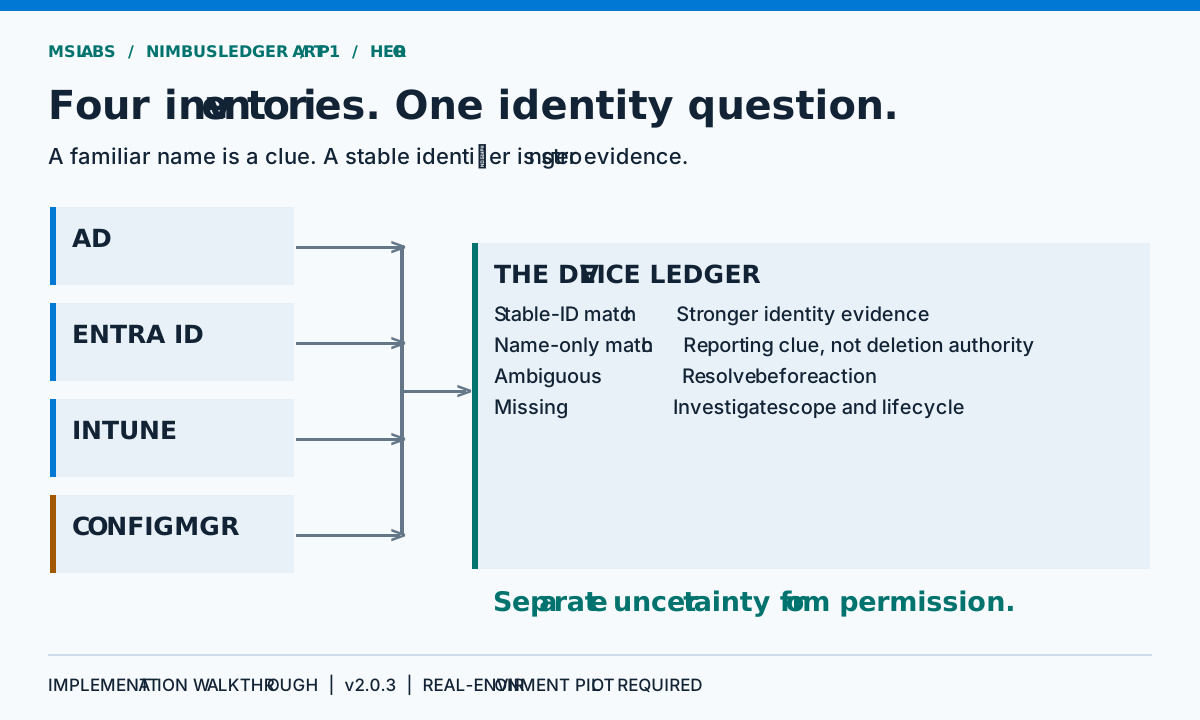
A Windows laptop can have quite a busy administrative life. Look it up in Active Directory and there is a computer account; Entra ID has a registration, Intune has a managed-device record, and Configuration Manager has a resource. All four names look familiar. Then you check the dates and discover that one platform still remembers the device before its last rebuild.
Putting those four rows on a dashboard is the easy job. I'd want to know why they belong together, and what the application does when it cannot be sure. Four systems agreeing on a name is encouraging, but names get reused.
NimbusLedger addresses that gap with a .NET worker that collects inventories, reconciles identities and publishes a ledger for a separate web dashboard. Configuration Manager is optional; AD, Entra ID and Intune form the core collection. This series follows version 2.0.3, pinned to revision 88452d72893afc1d0ccdd0a20cab05d518ffc684.
This is an implementation walkthrough, not a production certification. Real directory permissions, API schemas, authentication and storage behavior still require pilot acceptance. Part 2 examines cleanup safeguards; part 3 covers operating boundaries.
Why another inventory view?
It helps to remember what each product is doing. AD manages directory computer objects, Entra ID represents device identities, Intune tracks management enrollment and contact, and ConfigMgr maintains discovery and client information. None of their consoles coordinates a lifecycle transaction across the other three.
Rename a device, enroll it again, delay discovery or lose a collector for a while, and differences are quite normal. Separate systems see different events on different schedules. Calling every discrepancy a product defect will make for a long meeting.
For endpoint and identity engineers, NimbusLedger puts those discrepancies where they can be examined together. You still need Intune compliance evaluation, ConfigMgr discovery, asset management and a formal decommissioning approval process. What the ledger adds is reconciliation you can inspect, with tight restrictions on the operations that follow.
Start with source objects, not display names
The shared identity model keeps a source record's key separate from the identifiers used to find counterparts.
| Source | Record identity | Cross-source evidence |
|---|---|---|
| AD | Computer object GUID | AD GUID and an available Azure device identifier |
| Entra ID | Directory object ID | Device registration identifier |
| Intune | Managed-device object ID | Associated Azure AD device identifier |
| ConfigMgr | Numeric resource ID | Discovered AD object GUID |
Be careful with these IDs. An Entra directory object ID is different from its device registration ID, and an Intune managed-device ID points to a different deletion target from an Entra object ID. The shared record keeps them separate. Its generic field names can still send you back to the source adapter to check which is which.
Names are useful for reporting, of course. The normalizer trims whitespace, removes a trailing computer-account dollar sign, takes the short-name portion before a dot and ignores case. This connects a short name with an FQDN, at the cost of also making identically named computers in different DNS domains look alike. I would use that as a clue, never as a universal identity.
A match has a kind
The index first gathers candidates for stable identifiers. If that finds a single source record, the result is StableId; multiple records produce Ambiguous. Only when there are no stable-ID candidates does the index try normalized names, producing NameOnly, Ambiguous or Missing.
The following is original explanatory pseudocode, not a repository excerpt or executable API:
look up counterpart records using stable identifiers
if exactly one counterpart exists: report a stable match
if several counterparts exist: report ambiguity
otherwise inspect normalized names
report name-only, ambiguous, or missing evidence
A stable identifier wins over a reused name. Name-only reporting is allowed on purpose: it can help an engineer investigate. Before deletion, though, the cleanup planner requires stronger evidence. A tidy row gives no permission to remove anything.
There is a small accounting detail worth checking before quoting the totals: ambiguity and name-only metrics count reconciliation comparisons. One physical computer compared against several sources can contribute more than once. They are not necessarily device counts.
Collect concurrently, publish only after success
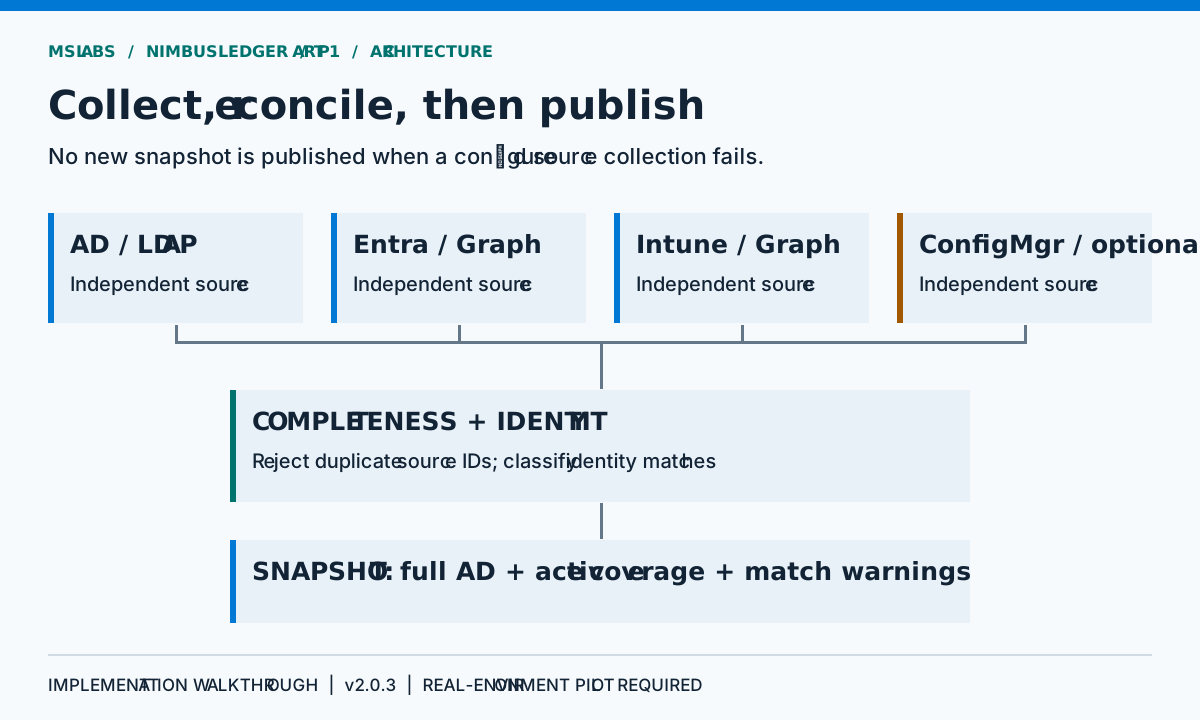
LedgerReconciliationService starts the source collections before waiting for them together. This reduces unnecessary sequential latency. It does not make LDAP and Graph share a transaction or observation timestamp.
After collection, duplicate source object IDs abort the reconciliation. Reused cross-source identities are a different problem: the matching and planning paths handle their ambiguity. An exception from a source prevents this reconciliation from publishing its new snapshot, leaving the previous published ledger available.
During an outage, keeping the previous ledger is the sensible choice. Publish only the two sources that answered, and a transport problem suddenly looks like devices disappearing.
Do not give InventoryComplete more meaning than it has. The configured collection paths completed; that says nothing about whether the service account could see every intended object. A narrow LDAP search base or insufficient Graph access can still produce a misleadingly small inventory. Check counts and a sample of identities against expectations obtained independently.
Active coverage and full inventory serve different questions
For coverage reporting, the service selects active AD computers using the configured last-logon window, then compares that population with the other inventories. This produces the missing-in-source lists.
It also retains all collected AD computers in AllActiveDirectoryComputers, including records outside that active subset. Cleanup planning needs to find old AD counterparts; throwing them away would make a coverage report an unsuitable lifecycle input.
Everything outside the active subset contributes to the stale count, including unknown activity. That is an important qualification: stale here does not mean confirmed abandoned.
An ambiguous match is included in the relevant missing list because the service cannot establish a reliable counterpart. A name-only match is counted separately and is not listed as missing by this reporting path. Neither convention silently upgrades uncertainty into permission to delete.
ConfigMgr integration is a join, not one convenient endpoint
The AdminService client combines two sources inside ConfigMgr:
wmi/SMS_R_System, selecting resource IDs and AD object GUIDs.v1.0/Device, providing device and activity information.
The join uses resource ID. You need both responses because the activity view does not simply supply the stable discovery identity as well.
Responses use an OData value collection and may contain @odata.nextLink. The client follows pages, rejects repeated links and restricts continuation to the configured HTTPS origin and AdminService path. HTTP redirects are disabled in the client registration.
The GUID parser accepts GUID text, base64 bytes or a byte array and checks byte length. I'd still verify the representation against the actual site version. If the discovery GUID is missing, a reporting name match may survive, but ConfigMgr cleanup's stable-identity requirement is not satisfied.
When ConfigMgr is disabled, the snapshot uses null for its inventory and missing list. That means not collected, not “successfully checked and found nothing.”
Activity is evidence with a source
The Entra adapter maps approximate last sign-in time into the shared activity field. The Intune adapter maps last sync time there.
Neither field tells you when a user last touched the keyboard. AD's replicated logon timestamp updates in its own way, and ConfigMgr uses another activity clock again. Conservative thresholds help with the differences; none of these timestamps proves that the physical endpoint has been retired.
Unknown timestamps deserve their own interpretation. Part 2 follows a particularly consequential example: an unset LDAP FILETIME must not become evidence of centuries of inactivity.
What to validate before trusting the ledger
I'd begin read-only, with counts and selected identities checked against the source systems. Make the sample awkward: a renamed device, a re-enrolled one, duplicate short names, a missing discovery GUID and a computer with no recorded logon. Interrupt a collector too. The old snapshot should remain visible; partial evidence must not replace it.
Read the collection start time, capture time and freshness warning together. Complete data can be old, while recent data can cover the wrong scope perfectly well.
Deciding which objects the organization intended to collect is still an operator's job. Continue with the cleanup safety model, and have a look at the pinned repository before trusting a reassuring count.
Source and reuse boundary
All scenarios, explanations, pseudocode and artwork in this article are original and use generic examples. Source references describe public NimbusLedger revision 88452d72893afc1d0ccdd0a20cab05d518ffc684.
No repository-level license is declared at this revision. Public visibility is not a license grant. This article therefore does not reproduce repository source code or imply permission to redistribute it. Establish the applicable terms with the repository owner before reusing its implementation.