Series · Foundry Local: from local inference to useful file organization · Part 3 of 3
Foundry Local · Model lifecycle · Execution providers · Warmup · .NET
Foundry Local, part 3: getting the model ready
Download and prepare the approved model and execution provider before scanning files. A startup probe helps, but the parser and real workflow need their own checks.
- Drafted
- Published
- Updated
- Reading time
- 15 min
- Author
- Roberto Gramellini
Source: Owner-authorized file-organization implementation (private repository)
- model download
- runtime acquisition
- startup probe
- preparation timeout
- per-user model cache
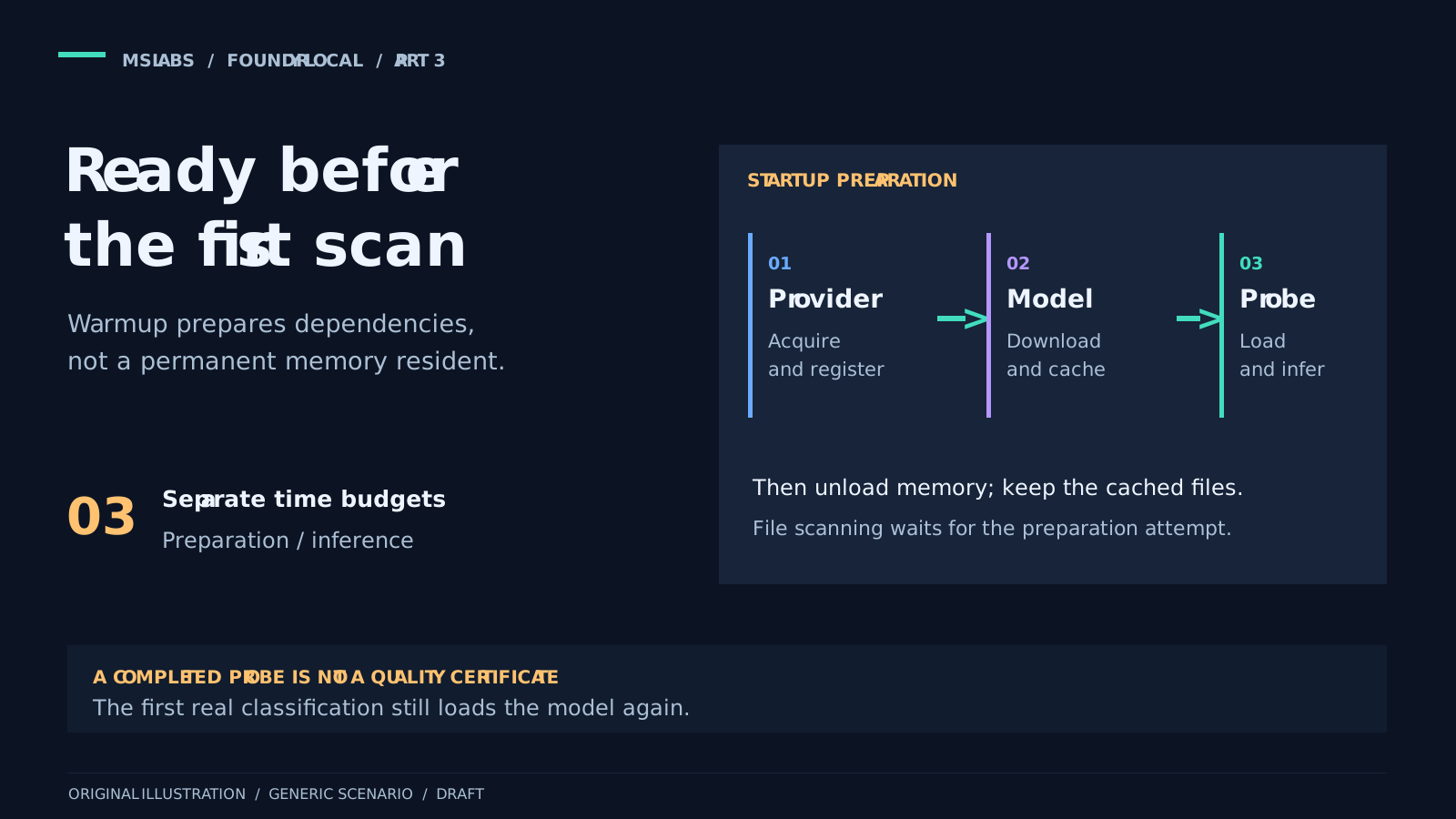
Consider the first run on a newly provisioned device. A file needs a category, but the model is not downloaded and its hardware execution provider is not registered. The application has a twenty-second inference allowance. That will not be much use if the request first has to acquire its dependencies.
I would rather deal with that during startup than discover it on the first document. Warmup gives the SDK time to prepare the model and execution dependencies before the first file scan. In this application, that is its main purpose; it is not just a trick to make the next request faster.
We covered the architecture in part 1 and the classifier in part 2. Here we can follow startup preparation, including a few things a successful warmup cannot tell us.
Which dependencies are we preparing?
It helps to separate three things that often get called "the runtime."
Application and SDK binaries ship with the application. This .NET 10 project pins Microsoft.AI.Foundry.Local 2.2.1. Its content-aware version also ships the parser code and PdfPig 0.1.16. Foundry Local does not acquire that document parser as an execution provider.
The hardware execution provider lets ONNX Runtime run the selected variant. It may be bundled, already registered or need acquisition and registration, depending on the package and platform.
The model artifacts go into the application's local cache when missing and when downloads are permitted. After that, the model still has to load into memory.
When diagnosing a failed startup, I want to know which of these failed. The dynamic preparation here handles the selected provider and model. It neither downloads an arbitrary .NET runtime nor installs the Foundry Local CLI.
Microsoft's architecture overview and SDK reference explain the platform differences, including Windows/WinML integration. The sequence below belongs to this pinned application, so do not treat it as a bootstrap recipe for every package.
The service can start while the model gets ready
The worker awaits optional warmup at the start of BackgroundService.ExecuteAsync, before the organization loop. Under .NET 10, that work does not need to block the Windows service startup thread for the duration of a model download.
The host can therefore be running while file processing waits for preparation. Those are different readiness states.
Warmup runs only with AI enabled, the native SDK provider selected and a valid installed policy. It can still prepare dependencies with organization disabled or no eligible files. That lets an operator prepare the device before enabling real transfers.
This coordinator runs at startup, not on a recurring provisioning schedule. Later requests can retry through the governed inference lifecycle.
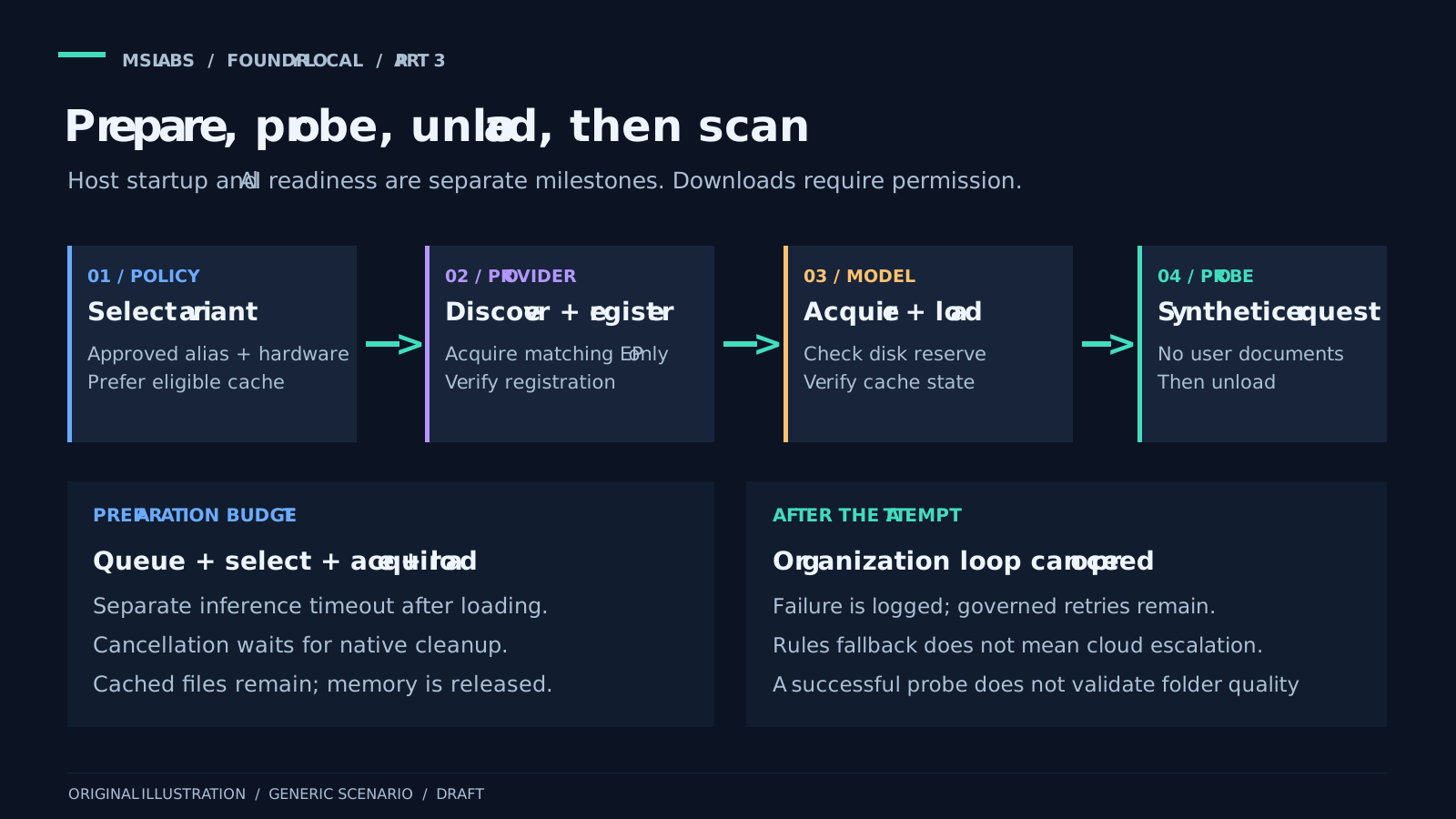
A small synthetic request is enough for the probe
The entry point is short:
public async Task WarmupAsync(AiCategoryOptions options, CancellationToken cancellationToken)
{
    await ExecuteAsync(options, "Reply only READY.", "Startup readiness check. No user documents.",
        Math.Min(options.MaxOutputTokens, 16), cancellationToken);
}
Its ExecuteAsync call goes to the application's shared preparation/inference/cleanup method, not a standalone SDK API.
There is no need to open a user's document to prepare the model. This synthetic input exercises the same native route as real requests, with no more than sixteen output tokens.
Adding content-aware categorization does not change that. Warmup goes straight to the native coordinator. It bypasses the file resolver, so it opens no source file and tests neither protection inspection, extraction, the taxonomy nor the second content-stage request.
One detail is easy to overread: the code asks for READY, but does not check that the answer equals READY. Success tells us that selection, preparation, loading and a bounded completion finished without a detected error. It does not validate the meaning of the answer, the folder contract or model quality.
I would label a dashboard accordingly. The native call worked at that moment. Saying the model is fully validated would go further than the evidence.
Test the parser separately
With content mode enabled, the actual user identity must also be able to capture an approved local document and start the resource-limited parser. The synthetic model call checks neither operation.
The parser is a short-lived application subprocess, separate from Foundry Local hosting. It receives bounded snapshot bytes over private stdin. No cloud credentials or host override variables are inherited, and the Windows job must be attached before bytes are sent. Completion or cancellation reaps the process.
Its default five-second wall-clock allowance is per invocation. Protection inspection runs before metadata inference and cache reuse. Extracting an excerpt is another invocation, only after explicit abstention. The job allows one process, 512 MiB and ten CPU seconds. These are resource controls, not an OS security sandbox.
For rollout, I would keep these checks separate:
| Check | What success establishes |
|---|---|
| Native synthetic warmup | Model/provider selection, preparation, loading and a bounded completion worked then. |
| Parser smoke test with invented fixtures | The deployed parser and process/resource controls work for those supported fixtures under that identity. |
| Content-aware classification pilot | Metadata abstention, bounded extraction, taxonomy validation and file/policy revalidation work for the pilot cases. |
| Organizer dry-run and transfer checks | Filesystem authorization and the later transfer workflow behave as expected, independently of inference. |
Do not combine the checks by feeding a convenient real document into warmup. Keep the model input synthetic and prepare separate invented TXT, DOCX and textual PDF fixtures. Include protected, malformed and image-only cases too.
Enabling LocalContent does not authorize downloads. The acquisition policy below still controls the model and provider. Content mode needs a nonempty approved taxonomy and a local provider, and an invalid combined policy can stop native warmup as well as classification.
Choose the model before downloading
One semaphore serializes selection, preparation, inference and cleanup. Warmup and classification cannot race over the native state owned by this coordinator.
For each approved alias, the coordinator gets available variants, including eligible cached ones. Candidates must satisfy the alias, optional exact variant ID, hardware preference and a known positive catalogue size within the configured ceiling.
A suitable cached variant wins over a new download within that alias. With acquisition disabled, uncached candidates are not downloaded. If nothing meets the complete policy, preparation fails. It does not try an arbitrary model URL or another provider.
An explicit GPU/NPU preference may exclude CPU variants. Automatic hardware selection still has to respect application policy. Pinning an exact variant can make rollout easier to control, provided someone also owns the update process.
The fixed cache is in the current user's application-data directory, and native initialization rejects LocalSystem. Test under the eventual worker identity. A successful warmup under an administrator or deployment account does not prepare or verify that other user's cache and provider.
The selected variant decides which provider is needed
The adapter reads the selected variant's provider identifier and matches it against SDK discovery, tolerating the conventional ExecutionProvider suffix. It does not guess the provider vendor from the device name.
An already registered provider needs no acquisition. An unregistered provider with downloads forbidden causes preparation to fail. Otherwise the adapter checks the disk reserve, downloads/registers only the matching provider, then runs discovery again.
Both checks matter: acquisition must succeed, and the matching provider must be registered afterwards. A completed download call alone is not enough.
For some providers, discovery exposes no downloadable bootstrapper. The adapter then proceeds to loading and the probe to establish usability. It does not register an unrelated provider in the hope that something will run.
This is the provider-acquisition work hidden behind "warmup." Having the model file may not be enough to run its hardware-specific variant.
The complete method below includes acquisition and the check afterwards. The model argument wraps an approved SDK variant. GetManagerAsync initializes the fixed per-user manager; FindExecutionProvider matches identifiers and EnsureDiskReserve checks observed free space.
public async Task PrepareExecutionProviderAsync(IFoundryLocalModel model, bool allowDownload,
    long minimumFreeDiskBytes, CancellationToken cancellationToken)
{
    var current = await GetManagerAsync(cancellationToken);
    cancellationToken.ThrowIfCancellationRequested();
    var provider = FindExecutionProvider(current.DiscoverEps(), model.ExecutionProvider);
    if (provider is null)
    {
        // CPU and other bundled providers need no downloadable bootstrapper. Actual loading
        // and the startup probe verify usability; never substitute an unrelated provider.
        logger.LogInformation(
            "Native execution provider has no downloadable bootstrapper; model loading will verify the bundled runtime. Provider={Provider}, Hardware={Hardware}",
            model.ExecutionProvider, model.Hardware);
        return;
    }

    logger.LogInformation("Native execution provider discovered. Provider={Provider}, Hardware={Hardware}, Registered={Registered}",
        provider.Name, model.Hardware, provider.IsRegistered);
    if (provider.IsRegistered) return;
    if (!allowDownload)
    {
        throw new InvalidOperationException("Native execution provider is not registered and acquisition is disabled.");
    }

    EnsureDiskReserve(minimumFreeDiskBytes);
    var lastPercent = -10;
    var result = await current.DownloadAndRegisterEpsAsync([provider.Name], (_, progress) =>
    {
        cancellationToken.ThrowIfCancellationRequested();
        EnsureDiskReserve(minimumFreeDiskBytes);
        if (!double.IsFinite(progress)) return;
        var percent = (int)Math.Clamp(progress, 0, 100);
        if (percent >= lastPercent + 10)
        {
            lastPercent = percent;
            logger.LogInformation("Native execution provider acquisition. Provider={Provider}, Percent={Percent}",
                provider.Name, percent);
        }
    }, cancellationToken);
    cancellationToken.ThrowIfCancellationRequested();
    EnsureDiskReserve(minimumFreeDiskBytes);

    // The SDK result is not authoritative for an already discoverable but failed bootstrapper:
    // explicitly verify registration rather than treating a successful download call as readiness.
    if (!result.Success ||
        FindExecutionProvider(current.DiscoverEps(), model.ExecutionProvider)?.IsRegistered != true)
    {
        throw new InvalidOperationException("Native execution provider registration did not complete.");
    }

    logger.LogInformation("Native execution provider ready. Provider={Provider}, Hardware={Hardware}", provider.Name, model.Hardware);
}
DiscoverEps and DownloadAndRegisterEpsAsync are the pinned SDK calls; the model interface, manager helper and disk/matching helpers belong to the application.
That early return for an undiscovered bootstrapper does not, by itself, mean warmup succeeded. Loading and the synthetic call still have to work. And allowDownload permits acquisition; it does not ask for every provider in SDK discovery.
Check disk space while acquiring the model
Before downloading an uncached model, the coordinator compares observed free space with the catalogue size plus the configured reserve. Provider preparation comes first, followed by another space check, because acquiring the provider can consume some of that disk.
During download it checks cancellation and the remaining reserve. Progress logs are bounded instead of recording every callback. At the end it verifies that the selected variant is actually cached.
I would describe this as an eligibility check, not a quota. Catalogue sizes are rounded. Provider size is not exposed as an enforceable quota, and other processes may be using the disk too. Nothing here reserves space or guarantees an exact ceiling on expanded allocation.
The reference defaults are ten minutes for preparation, an 8 GiB model-size ceiling and a 2 GiB free-space reserve. Choose values for the actual model and fleet rather than adopting those numbers automatically.
Here is the acquisition loop inside SelectAsync. By this point the method has filtered the approved alias into eligible, checked for an acceptable cached variant and checked policy.AllowDownload. The SDK adapter belongs to runtime; cancellationToken is the preparation token.
foreach (var candidate in eligible)
{
    if (runtime.GetAvailableDiskBytes() < checked(candidate.SizeBytes!.Value + policy.MinimumFreeDiskBytes))
    {
        logger.LogWarning("Native acquisition excluded by disk eligibility. Alias={Alias}, Variant={Variant}", alias, candidate.Id);
        continue;
    }

    // Prepare only the EP identified by this hardware-specific catalog variant, not every
    // downloadable provider. Recheck model eligibility after EP acquisition consumes space.
    await runtime.PrepareExecutionProviderAsync(candidate, policy.AllowDownload,
        policy.MinimumFreeDiskBytes, cancellationToken);
    if (runtime.GetAvailableDiskBytes() < checked(candidate.SizeBytes!.Value + policy.MinimumFreeDiskBytes))
    {
        throw new InvalidOperationException("Native model disk eligibility changed after execution provider preparation.");
    }

    var lastPercent = -10;
    await candidate.DownloadAsync(progress =>
    {
        cancellationToken.ThrowIfCancellationRequested();
        if (runtime.GetAvailableDiskBytes() < policy.MinimumFreeDiskBytes)
        {
            throw new InvalidOperationException("Native model cache disk reserve depleted.");
        }

        // Model sizes and free-space observations are eligibility checks, not disk quotas.
        // The SDK exposes rounded catalog MiB, not exact expanded allocation requirements.
        if (!float.IsFinite(progress)) return;
        var percent = Math.Clamp((int)progress, 0, 100);
        if (percent >= lastPercent + 10)
        {
            lastPercent = percent;
            logger.LogInformation("Native model acquisition. Alias={Alias}, Variant={Variant}, Percent={Percent}",
                alias, candidate.Id, percent);
        }
    }, cancellationToken);
    cancellationToken.ThrowIfCancellationRequested();
    if (!await candidate.IsCachedAsync(cancellationToken))
    {
        throw new InvalidOperationException("Native model acquisition did not populate the cache.");
    }

    return candidate;
}
The selected wrapper's DownloadAsync delegates to the SDK model's DownloadAsync; this is not a custom downloader or a caller-provided URL.
The loop returns a cached model handle. It is not yet a loaded session. If candidates run out, the enclosing method eventually throws. Download, registration and post-download cache failures propagate to the warmup coordinator; none is reported as a successful preparation.
Give preparation and inference different timers
The preparation timeout covers queued waiting, catalogue/cache work, acquisition and loading. After loading, that timer is disabled and a separate inference timer starts. The reference default for inference is twenty seconds.
Without that separation, downloading could consume the answer budget before generation even starts. Equally, allowing ten minutes to acquire dependencies should not give every classification request ten minutes to think about a folder. There are enough decisions postponed to the next meeting already.
Native cancellation is cooperative. The application waits for native work and cleanup; it does not abandon the task through a managed timeout wrapper and unload resources still in use. These timers are cancellation budgets, not guaranteed wall-clock termination deadlines.
The model unloads in a finally block before the serialization gate is released. Shutdown waits for the owned native lifecycle before disposal too. I would rather wait for correct cleanup than display "canceled" early while native work is still running.
The full shared execution method shows where the timers and cleanup sit:
private async Task<byte[]> ExecuteAsync(AiCategoryOptions options, string systemMessage, string metadata,
    int maxTokens, CancellationToken cancellationToken)
{
    if (!options.Enabled || options.Provider != AiCategoryProvider.FoundryLocalSdk ||
        new AiCategoryOptionsValidator().Validate(null, options).Failed)
    {
        throw new InvalidOperationException("Invalid native SDK policy.");
    }

    using var lifetime = CancellationTokenSource.CreateLinkedTokenSource(cancellationToken, stopping.Token);
    // Waiting is part of preparation, not inference. Never abandon a native task via WaitAsync:
    // its cooperative cancellation must finish before unloading or disposing the SDK.
    using var preparation = CancellationTokenSource.CreateLinkedTokenSource(lifetime.Token);
    preparation.CancelAfter(options.LocalModel.PreparationTimeout);
    await gate.WaitAsync(preparation.Token);
    try
    {
        ObjectDisposedException.ThrowIf(disposed, this);
        var model = await SelectAsync(options.LocalModel, preparation.Token);
        preparation.Token.ThrowIfCancellationRequested();
        logger.LogInformation("Native model selected. Alias={Alias}, Variant={Variant}, Hardware={Hardware}, CatalogBytes={CatalogBytes}",
            model.Alias, model.Id, model.Hardware, model.SizeBytes);

        try
        {
            await model.LoadAsync(preparation.Token);
            preparation.Token.ThrowIfCancellationRequested();
            preparation.CancelAfter(Timeout.InfiniteTimeSpan);
            using var inference = CancellationTokenSource.CreateLinkedTokenSource(lifetime.Token);
            inference.CancelAfter(options.Timeout);
            var response = await model.CompleteAsync(systemMessage, metadata, maxTokens,
                options.MaxResponseBytes, inference.Token);
            inference.Token.ThrowIfCancellationRequested();
            return response;
        }
        finally
        {
            // Do not pass the canceled caller token: releasing the model must finish before
            // another request can use the singleton native state, even during host shutdown.
            await model.UnloadAsync();
        }
    }
    finally
    {
        gate.Release();
    }
}
The enclosing coordinator owns gate (a SemaphoreSlim), stopping (a shutdown cancellation source), disposed and the logger. SelectAsync performs the approved selection/acquisition workflow; the model interface delegates loading, completion and unloading to the native adapter.
The outer finally releases the gate and the inner one unloads the model. Both finish before response bytes reach the caller. Warmup and normal classification use this same method, so there are not two subtly different versions of native cleanup to maintain.
The first real request still loads the model
After the probe, the shared lifecycle unloads the model just as it does after a normal completion. The files remain cached.
That removes avoidable first-use acquisition, but the first real classification loads the model again. Warmup does not keep it permanently resident, guarantee minimum latency or ensure that future changes never require another download.
Content mode can add a second completion after metadata abstention. Because the model unloads after each request, that second call can load it again. Add parser invocations and source snapshots, and you have more work than a single completion. The twenty-second inference allowance is not a deadline for the whole document classification.
Keeping the model loaded across a batch might improve throughput, at the cost of RAM and more complicated lifetimes. That would be a different implementation. Here, cache deletion, identity or approved-model changes, driver changes and provider problems can all make preparation necessary again.
What happens when warmup fails?
The coordinator logs elapsed time and a bounded exception-type reason. It leaves out raw native exception text, which may include paths or status payloads. Host shutdown cancellation is propagated.
A failed warmup does not switch providers or permanently block organization. Later classifications retain retries, request budgets, the circuit breaker and deterministic fallback. The scan waits for the warmup attempt to finish, not necessarily for AI to become ready.
If you need the application to refuse all organization until AI is ready, you need a different gate. Rules are intentionally available in this design.
For diagnosis, keep policy rejection, alias/variant selection, hardware/provider registration, cache reuse, acquisition, progress, duration and failure stage distinguishable. Leave document names, raw prompts and answers out of lifecycle logs. Apply retention and access rules to the remaining workflow metadata.
What I would check before rollout
Start with clean and populated user caches. Try an unavailable provider, forbidden downloads, insufficient disk, canceled acquisition and a hardware preference with no eligible variant. Repeat under the actual worker identity and its network/proxy policy.
For content mode, add parser launch and resource-limit failures, unsupported or protected files, misleading names, explicit abstention, image-only PDFs and out-of-taxonomy output. Change a file or provider policy during inference too. Fallback should remain deterministic, with no excerpt replayed to Azure. Remember that suggestion-only and organizer dry-run are separate controls.
Use the separate AI and organizer controls to prepare dependencies before enabling transfers. Measure acquisition, cached reload, probe latency, protection inspection, extraction and the two completion stages separately. Runtime tests and parser fixtures still need a cold-start check on real hardware with real model binaries.
I have not performed a real model download or performance benchmark for this series. These articles describe verified code and its limits, not a measured service-level objective.
Try the platform, keep control of the files
The parts I would carry into another application are approved dependency selection, a synthetic call through the real native route, separate host/model readiness checks, and file authorization that remains outside the model.
Explore the public Foundry Local repository and Microsoft's getting-started guide.