Series · Chrome Policy Manager: from intent to verified policy · Part 3 of 3
Microsoft Intune · Chrome Enterprise · PowerShell · Entra ID · Azure
Chrome Policy Manager, part 3: user policies and API security
Check user-session tasks, temporary permissions and API identity controls, then follow queued Graph actions without mistaking a dispatch result for applied browser policy.
- Drafted
- Published
- Updated
- Reading time
- 10 min
- Author
- Roberto Gramellini
Source:
Chrome Policy Manager
· revision a3f63874
- Chrome HKCU policy
- interactive scheduled task
- device certificate
- API gateway
- Service Bus worker
- Graph remediation
Chrome Policy Manager, part 3: user policies and API security
The scope is still Chrome teams. Microsoft Edge is generally the recommended starting point for managed browsing in a Microsoft-centric enterprise, and many organizations already use it as their standard. Nothing here is an argument to replace it. Some teams run Google Chrome as their primary browser and need to manage it accordingly.
Chrome Policy Manager is aimed more specifically at teams needing the latest Chrome policy definitions without waiting for their management surface to expose new settings. A custom platform is a substantial commitment for that requirement. A new template also does not remove the need to test settings against the Chrome versions actually deployed.
A machine baseline can be correct while the user experience is wrong. Consider a shared Windows device where two signed-in users need different recommended Chrome settings. Then add an administrator who wants to dispatch remediation without giving every web-facing component broad Intune permissions. They may appear in the same portal, but these jobs need quite different identities.
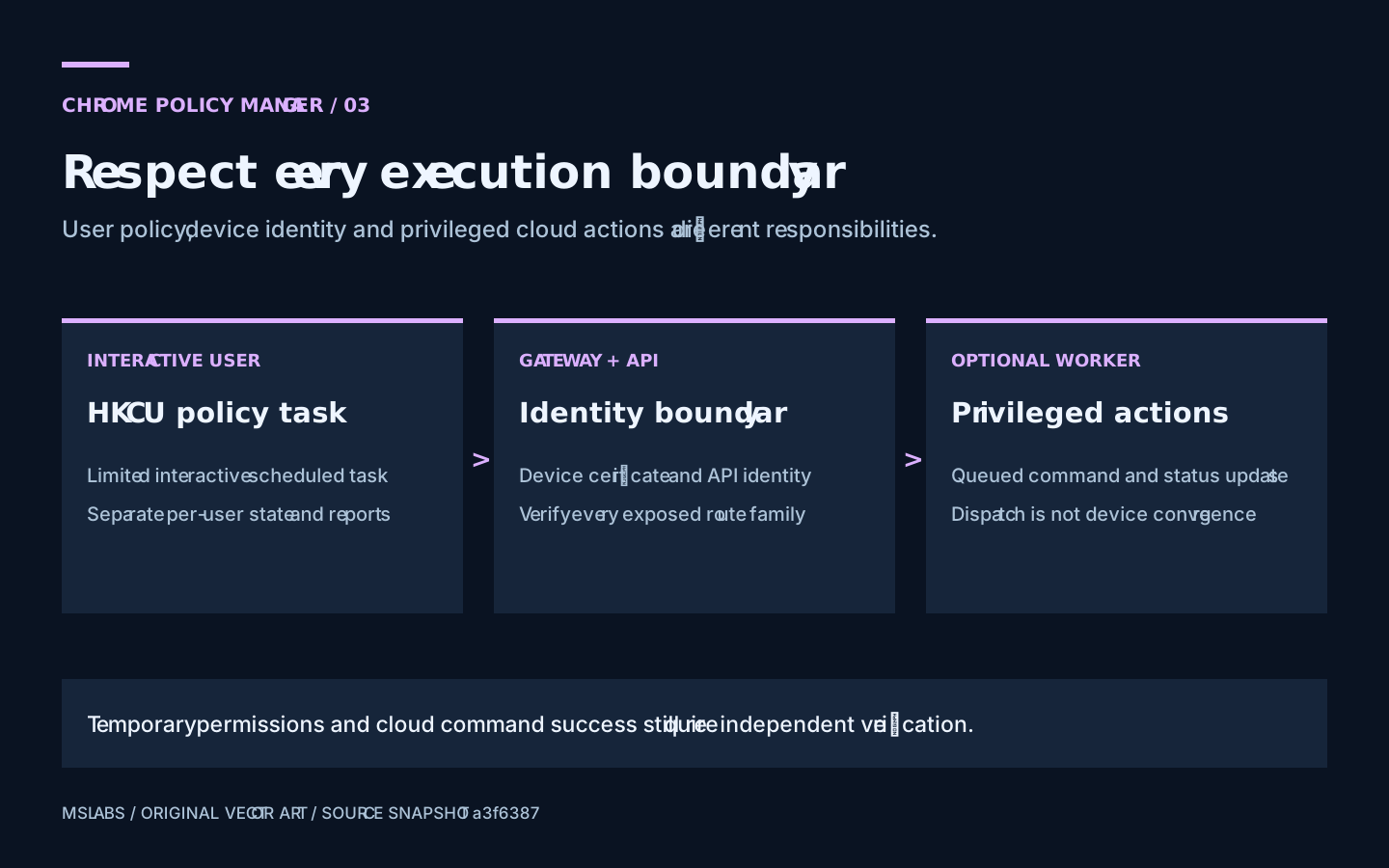
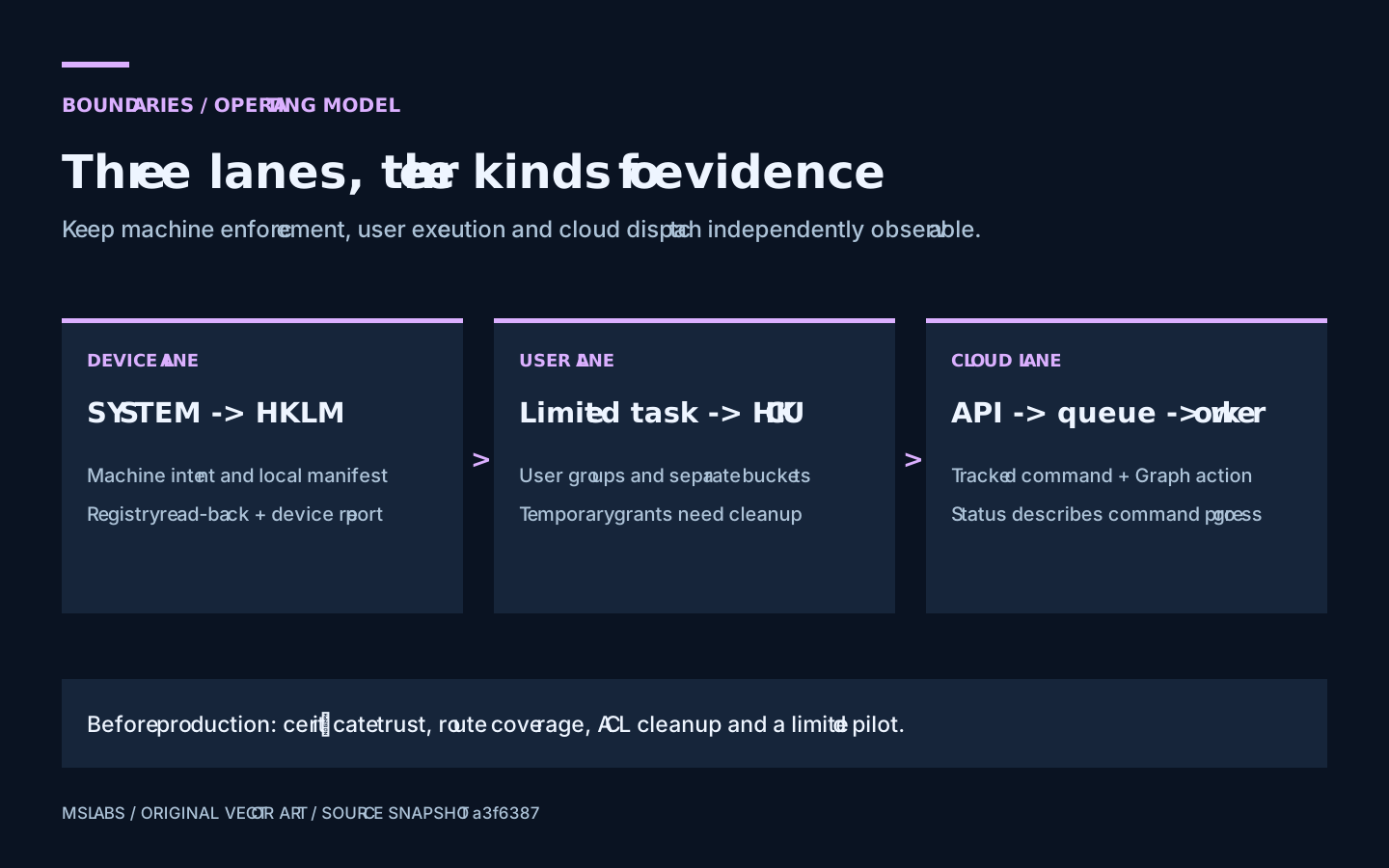
Chrome Policy Manager resolves machine and user policy separately. SYSTEM orchestrates a script running as the user, while an optional queued worker handles selected privileged Graph actions. I'll keep the resulting evidence separate too: registry state, a user's execution result and the progress of a cloud command do not establish the same thing.
This final part follows catalog and version lifecycle and resolution, registry conversion and drift detection, still at source snapshot a3f6387445f789cb6fef3409973fd2e2f969abed. Some controls below are implemented; others must be demonstrated by the operator before exposure. Keep that distinction when reading the deployment design.
Whose HKCU are you writing?
Run as SYSTEM and HKCU refers to SYSTEM's current-user hive. It does not follow the person looking at the screen. Writing machine policy under HKLM and user policy under HKCU therefore needs different execution plans.
On the server, EffectivePolicyService.cs uses device memberships for machine assignments and user memberships for user assignments. Separate response contracts and ETags are exposed by V2Endpoints.cs.
That avoids asking one hash to describe two identities. It also means a successful machine check cannot stand in for every user's policy result. Include the device-user pair in reports and troubleshooting; the device name alone is not enough.
Start a limited task for each detected user
Remediate-ChromePolicy.ps1 finds Apply-UserChromePolicy.ps1 and stages a user-readable copy. It then discovers interactive users through Explorer process owners and creates a transient scheduled task for each account.
The task runs limited, not in an elevated administrator session. The principal and time limit are explicit:
$principal = New-ScheduledTaskPrincipal -UserId $User.Account -LogonType Interactive -RunLevel Limited
$settings = New-ScheduledTaskSettingsSet -AllowStartIfOnBatteries -DontStopIfGoingOnBatteries -ExecutionTimeLimit (New-TimeSpan -Minutes 10)
$task = New-ScheduledTask -Action $action -Principal $principal -Settings $settings
Running as that account makes HKCU point to the right user's hive. Discovery through Explorer is narrower than a complete Windows session inventory, though. Other shells, unloaded profiles and every possible session type are not covered by that assumption. With no detected interactive users, the pass applies no user settings.
And the companion script must actually arrive on the device. The remediation searches an explicit override, its own directory and the staged destination. If the script is absent, it warns and skips user orchestration. Filling Intune's two familiar detection/remediation fields does not deliver this third file by implication. Check packaging in the pilot.
Check what "temporary" permissions leave behind
For the API request, the user task needs the device client certificate. SYSTEM attempts to give that account temporary read access to the certificate's private-key file. It also grants temporary write capability on the loaded user's Google policy registry branch, allowing the limited task to create or update HKCU policy.
I'd review those permission changes as part of the feature, rather than hiding them in deployment plumbing. The source attempts revocation in finally:
try {
    $r = Invoke-UserPolicyTask -User $u -UserScriptPath $UserScriptDeployPath -DeviceId $DeviceId
    if ($r.Status -eq "Success") { $summary.Succeeded++ } else { $summary.Failed++ }
    $summary.Details += $r
    Write-Log "User $($u.Account): $($r.Status) (written=$($r.KeysWritten), removed=$($r.KeysRemoved))"
}
finally {
    Revoke-CertPrivateKeyRead -KeyFile $keyFile -Account $u.Account
    Revoke-UserPolicyKeyWrite -RegistryPath $policyKeyPath -Account $u.Account
}
A finally block is good structure. It cannot guarantee restoration after process termination, host shutdown or an ACL operation failure. Some grant and revoke helpers warn and return on failure. Inspect the final ACLs during a pilot; seeing the cleanup function in a log is not the same check.
Record the existing permissions too, then compare afterward. Granting and removing an entry is not a general snapshot-and-restore transaction. Keep write access to the staged script restricted to administrators so ordinary users cannot replace executable content. User-readable result files also need more scrutiny than authenticated evidence.
A user result needs freshness and read-back checks
Once running, Apply-UserChromePolicy.ps1 determines the current UPN, gets device-binding information and retrieves policy. It writes the mandatory and recommended buckets under HKCU.
The supplied device identifier helps correlate the request. It does not cryptographically prove that the requested UPN belongs to the caller. The v2 endpoint logs that correlation value and resolves the UPN's groups. Before production, authorization must establish which caller may request which user on which device. A logged relationship is still only a logged relationship.
The per-user manifest records managed names, and a separate document records the result. An empty user-policy response removes previously managed keys and clears the managed-name lists. That handles leaving a target group, provided the empty response was intentional. Remember part 2: failed group lookup can also look empty.
The parent reads the result JSON from the profile and aggregates successes and failures. That reader has no per-run correlation check proving this invocation generated the file. I'd check freshness before treating it as a current result, and I would not call it an attestation.
The timings do not quite line up either: the parent polls for about five minutes, but the task has a ten-minute execution limit. Unregistering a task does not by itself prove that its already running process stopped. Test a slow run and an interrupted one, then inspect running tasks, result timestamps and restored permissions.
Finally, the user script does not perform the same canonical post-write verification used by machine inline remediation. Check the actual user registry and Chrome's interpretation separately. Similar scripts can produce success messages backed by different amounts of evidence.
Check every route that can reach the API
For direct backend access, ClientCertificateMiddleware.cs can validate certificates against a configured custom root bundle. Chain building includes validity dates and configurable revocation behavior.
With a configured gateway, ApimGatewayMiddleware.cs checks the gateway identity instead. Certificate middleware stands down in that mode because the device connection terminates at the gateway.
A mention of mTLS in the repository is not enough to approve exposure. Trace who enforces identity on each route. The reviewed middleware path lists name /api/devices, while the v2 contracts use /api/v2/devices and /api/v2/users. Those prefixes differ. Verify actual authorization coverage and block external exposure until equivalent controls are demonstrated for the v2 families.
The sample APIM policy removes selected incoming identity headers, forwards device identity and uses managed identity to authenticate to the backend. Its visible certificate checks cover presence, expiry and issuer text. An issuer-string match does not demonstrate full chain validation and revocation enforcement at the gateway. Treat the sample accordingly, not as a finished production trust policy.
A forwarded identity also needs enforcement against the requested device, rather than just storage alongside it. Review header provenance, client-authentication usage, route-to-identity checks and whether the backend can be reached another way. This snapshot is not being certified as hardened here. Its example infrastructure identifiers are unnecessary to understand or evaluate the design.
What the queued worker confirms
The optional worker is about privileged cloud actions, not registry application. CommandPublisher.cs stores a tracking record, queues the command envelope and updates status. A separate worker receives selected commands and invokes Graph actions.
Read those states literally. Pending means intent was recorded by the API. Dispatched means queue submission succeeded, and InProgress means worker processing began. A terminal result describes the command outcome. The device's later registry verification is still a separate event.
On failure, CommandHandlerFunction.cs reports the result and rethrows. That lets the messaging infrastructure retry:
await _status.PublishAsync(new CommandStatusUpdate
{
    CommandId = envelope.CommandId,
    Status = CommandStatus.Failed,
    Error = ex.Message
}, ct);
throw; // let Service Bus retry / dead-letter
I'd test the awkward case where Graph performs the action but status publication fails. A tracking row cannot establish exactly-once external execution. Duplicate delivery and idempotency still need a deliberate answer.
At this revision the worker handles remediation dispatch, while webhook-subscription synchronization is explicitly a skipped stub. Also inspect detailed counts when you see Succeeded: the aggregate mapping can use that label when some dispatches failed and others succeeded.
The push service retains direct execution paths too. Installing a worker therefore does not prove the API no longer needs or uses privileged permissions. Check the enabled path and give each identity only what its actual work requires.
What would stop me exposing this service
For device access, I'd want demonstrated certificate issuance and renewal, route coverage, authenticated identity binding and an isolated registry pilot. For user application, I'd need the companion script delivered, supported sessions tested, per-user authorization checked, final ACLs inspected and results shown to be fresh.
The cloud worker needs its own checks: queue access, identity permissions, duplicate delivery, dead-letter visibility and detailed outcomes. Passing the user-task tests says little about those.
Set report access and retention deliberately. Device names, user identities, OS information and diagnostic messages are useful for operations, but they also carry privacy obligations. A verbose diagnostic setup should not become the permanent service configuration by accident.
Then demonstrate rollback for each kind of work. Restoring a policy version does not repair assignment references automatically. Removing a task does not undo registry writes. A successful Graph dispatch does not establish browser convergence. This is one occasion when asking for separate evidence is not bureaucracy for its own pleasure.
Inspect the pinned ChromePolicyManager repository and trace the routes your environment will use. The series should help you find the questions worth asking. The deployment still has to supply the answers.
Source and attribution
The explanations and artwork are original. Short code excerpts are reproduced from the linked files under the repository's MIT license.
MIT License
Copyright (c) 2026 Roberto Gramellini
Permission is hereby granted, free of charge, to any person obtaining a copy of this software and associated documentation files (the "Software"), to deal in the Software without restriction, including without limitation the rights to use, copy, modify, merge, publish, distribute, sublicense, and/or sell copies of the Software, and to permit persons to whom the Software is furnished to do so, subject to the following conditions:
The above copyright notice and this permission notice shall be included in all copies or substantial portions of the Software.
THE SOFTWARE IS PROVIDED "AS IS", WITHOUT WARRANTY OF ANY KIND, EXPRESS OR IMPLIED, INCLUDING BUT NOT LIMITED TO THE WARRANTIES OF MERCHANTABILITY, FITNESS FOR A PARTICULAR PURPOSE AND NONINFRINGEMENT. IN NO EVENT SHALL THE AUTHORS OR COPYRIGHT HOLDERS BE LIABLE FOR ANY CLAIM, DAMAGES OR OTHER LIABILITY, WHETHER IN AN ACTION OF CONTRACT, TORT OR OTHERWISE, ARISING FROM, OUT OF OR IN CONNECTION WITH THE SOFTWARE OR THE USE OR OTHER DEALINGS IN THE SOFTWARE.