Series · BitLocker Key Monitor: proving recovery keys exist · Part 3 of 3
Security Architecture · Encryption · SQL Server · BitLocker
Encrypting stored BitLocker recovery keys
Part 3 of 3. Encrypt recovery values before SQL storage, bind them to their rows, and understand what still depends on key handling, migration and operator controls.
- Drafted
- Published
- Updated
- Reading time
- 6 min
- Author
- Roberto Gramellini
Source:
BitLocker Key Monitor
· revision 6390107e
- encryption at rest
- AES-GCM
- AAD
- envelope encryption
- Always Encrypted
- TDE
- data encryption key
- key wrapping
- recovery mnemonic
- threat model

Collect recovery keys in one database and you have also collected a very good reason to attack that database. In Part 2 we followed their journey to Azure. Here the transport work is finished. The keys are sitting in SQL, where a sufficiently privileged person can run a query.
I'd rather start with that person than with an encryption badge. What can they read? What happens if they move a value into the wrong row? And who holds the key needed to make sense of the result? Those questions explain the layers below, including the work those layers leave unfinished.
Start with what a SQL reader can see
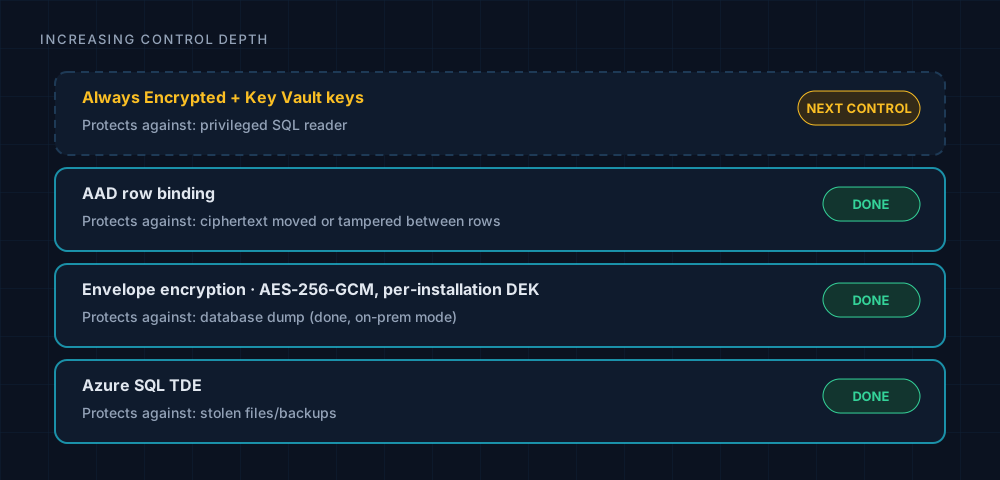
Figure 1. Read the dashed layer carefully: it is recommended work, not an implemented protection being claimed here.
TDE protects database files and backups. Give someone permission to run SELECT against the live database, though, and TDE does not hide the returned values from them. The on-premises mode therefore encrypts each recovery value before writing it, using envelope encryption. It also authenticates the row context. Hiding the password is only part of the job; returning it under the wrong device would be bad too.
Binding ciphertext to its own row
The encrypt path fits in one excerpt. Take a moment over the associated data rather than skipping straight to the encryption call:
// src\BitLockerKeyMonitor.Core\Security\RecoveryKeyStorageEncryptor.cs (lines 73-98)
if (string.IsNullOrEmpty(plaintext)) return plaintext;
if (dek.Length != DataKeyWrapper.DekSize)
    throw new ArgumentException($"DEK must be {DataKeyWrapper.DekSize} bytes", nameof(dek));

var plainBytes = Encoding.UTF8.GetBytes(plaintext);
var nonce = new byte[NonceSize];
RandomNumberGenerator.Fill(nonce);

var ciphertext = new byte[plainBytes.Length];
var tag = new byte[TagSize];

var aad = BuildRowAad(deviceId, source, keyId);

using var aes = new AesGcm(dek, TagSize);
aes.Encrypt(nonce, plainBytes, ciphertext, tag, aad);

var combined = new byte[NonceSize + TagSize + ciphertext.Length];
Buffer.BlockCopy(nonce, 0, combined, 0, NonceSize);
Buffer.BlockCopy(tag, 0, combined, NonceSize, TagSize);
Buffer.BlockCopy(ciphertext, 0, combined, NonceSize + TagSize, ciphertext.Length);

return Prefix + Convert.ToBase64String(combined);
The stored format is bkmdb:v1$ followed by base64(nonce[12] || tag[16] || ciphertext). The AAD contains the device, source and key identifier. Copy ciphertext into a different device's row and that context no longer agrees: GCM authentication fails.
That is a useful failure. An encrypted database dump alone does not expose the protected passwords, and swapping row values does not quietly give an operator somebody else's key. Of course, neither statement excuses poor control over the decryption key.
Decryption does not try to be helpful with damaged input. It rejects a truncated value early; failed authentication produces a CryptographicException. I'd much prefer an explicit error here to an empty string that the next layer might interpret as "no recovery key":
// same file (lines 105-108)
var b64 = value[Prefix.Length..];
var combined = Convert.FromBase64String(b64);
if (combined.Length < NonceSize + TagSize)
    throw new CryptographicException("DB row ciphertext is truncated.");
Who protects the protector?
The rows share a per-installation data encryption key (DEK). That key is not stored in plaintext. Instead, two independent slots hold wrapped copies: one can be opened with the passphrase and the other with the recovery code. Either secret provides a way back in:
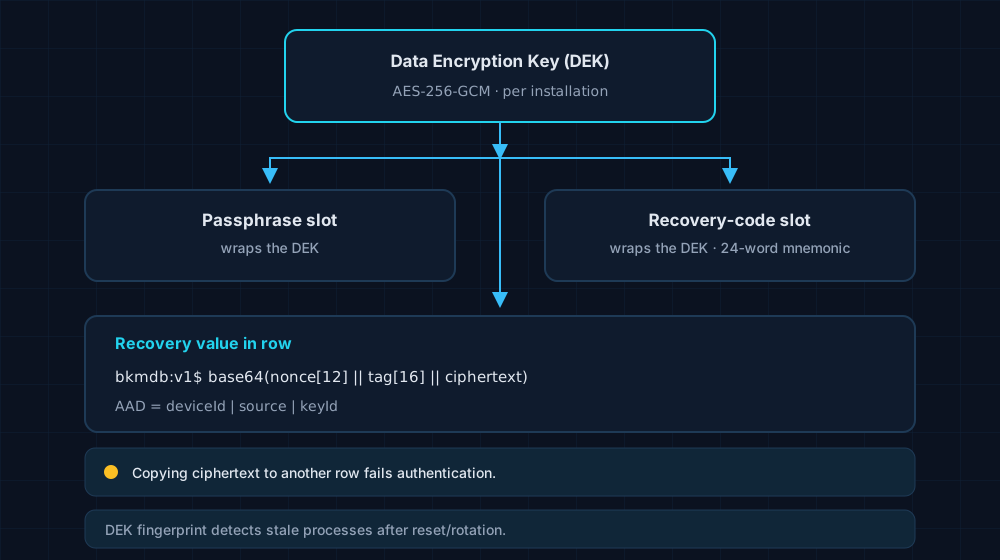
Figure 2. The two access routes lead to the same DEK, but their authenticated wraps cannot be exchanged.
// src\BitLockerKeyMonitor.Core\Security\DataKeyWrapper.cs (lines 80-90)
/// <summary>
/// AAD bound to a slot identifier. Different bytes per slot so a passphrase-slot wrap
/// cannot be swapped to the recovery slot (AES-GCM tag would not verify).
/// </summary>
private static byte[] BuildSlotAad(WrapSlot slot) => slot switch
{
    WrapSlot.Passphrase => "bkm-dek-wrap-v1|slot=passphrase"u8.ToArray(),
    WrapSlot.Recovery   => "bkm-dek-wrap-v1|slot=recovery"u8.ToArray(),
    _ => throw new ArgumentOutOfRangeException(nameof(slot))
};
Here the slot identifier does the job that row context did earlier. A wrap can be perfectly valid in its own slot and still fail authentication when substituted into the other.
There is a less glamorous problem after the cryptography: the worker and web portal are separate processes sharing that DEK. They need to agree on which key is current. A background reconciler checks fingerprints every 30 seconds. If the portal rotates or resets the key, the worker detects the change and re-unlocks. When that cannot be completed, it enters degraded mode and scans fail closed. Keeping the process alive is acceptable; continuing to write with a stale key is not.
What still needs an operator
- A privileged SQL reader remains part of the threat model. TDE alone cannot address that. The documentation recommends Always Encrypted with Key Vault-managed keys as the next control; the dashed box in the diagram must not become a completed item in a review.
- Someone has to bootstrap encryption. Stop the services, use local administrator rights and preserve the one-time 24-word recovery mnemonic. This is a ceremony, yes, but losing the recovery material is not a paperwork problem you can resolve at the next meeting.
- Migration leaves a mixed period. New rows are encrypted while legacy plaintext rows remain readable. Account for that exposure rather than assuming an upgrade retroactively protected everything.
- This is a single-tenant design. Serving multiple tenants would require per-tenant data-encryption keys. The existing installation key is not a shortcut to tenant isolation.
The timings and limits worth keeping nearby
These values describe version 2.45.0. They are useful when checking whether a quiet worker is simply between cycles or something needs attention.
| Item | Value |
|---|---|
| Worker compliance re-evaluation | every 5 minutes |
| Azure coordinator cycle | every 1 minute |
| Heartbeats | every 30 seconds |
| Intake request limit | 24 MiB |
| SQL long-term backup retention | 12 weekly, 12 monthly, 5 yearly |
| Version covered | 2.45.0 |
Where this leaves the recovery service
The scanner checks the escrow claim; the sealed intake limits what the exposed service can read; row authentication ties stored ciphertext to the device it belongs to. None of those jobs makes the others unnecessary. I'd keep the exposed edge simple and make the remaining limits visible to whoever operates the service, not just whoever designed it.
The repository is private, so this series shares the ideas and a few verbatim excerpts rather than the whole codebase. There is no need to wait for a recovery screen to discover whether the service has a usable key. That is the check worth doing beforehand.